





Docker. Containers. Transforming orchestration as we know it. A cutting-edge Platform as a Service. Build, share, and deploy apps anywhere with ease. Ever wondered how Docker works? It’s all about expertise and dedication.
In this article, we will explore the answers to these questions:
- What are the dependencies of a .NET application when running locally?
- What dependencies are required when deploying a .NET application?
- How can we make a .NET application run independently within containers?
- What steps are necessary to ensure a .NET application runs independently?
Pre-requisites
- Docker
- Containers
- Open Container Initiative (OCI)
- Dot Net framework
Abstract
Container technologies have been widely adopted in recent years to streamline software delivery with just a few commands. This article explores the process of containerizing a .NET application, providing a step-by-step guide, an explanation of key terms, a dependency tree analysis, and an overview of .NET components for seamless deployment. We also present a qualitative analysis of the .NET architecture and its components. Docker-related resources are included at the end of this article.
Motivation
In the fast-paced world of technology, staying current is key to success. This article empowers you to not just memorize, but truly understand and apply new concepts. By embracing learning and hands-on practice, you'll be equipped to adapt and thrive in an ever-evolving landscape.
Technology evolves constantly, and staying updated is essential. Let's focus on understanding, learning, and demonstrating to keep advancing.
Introduction
.NET applications often depend on external libraries, frameworks, and services, which can lead to challenges like version conflicts and environment-specific issues. Managing these dependencies is key to ensuring consistent behavior across environments.
Making .NET applications independent improves portability, scalability, and maintenance. Containerization with Docker helps by encapsulating the application and its dependencies into a portable unit, enabling seamless deployment and easy scaling across various environments.
Understanding Dependencies in .NET Applications
What are application dependencies?
Application dependencies are external libraries, frameworks, or services that an application relies on to function properly. Lets see what are the dependencies for a dotnet core web api application.
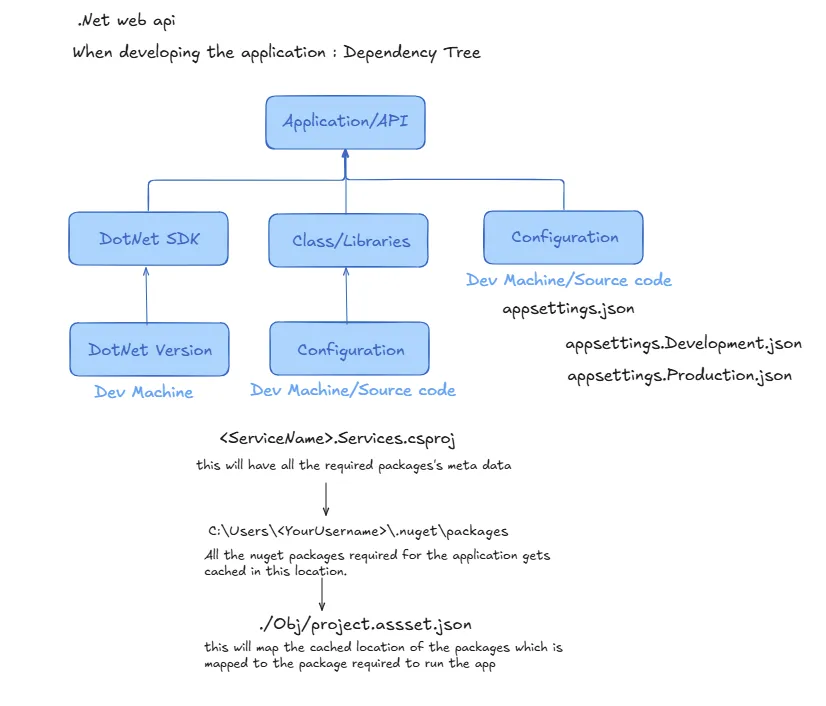
From the diagram above, we can see that during the development of a .NET application, there are three main factors we depend on. These include the .NET Software Development Kit (SDK), the classes and libraries used for building new features (often sourced from Microsoft’s NuGet packages), which depend on the versions managed by Microsoft, and the application's build configurations, such as database connection strings, client IDs, client secrets, and other settings.
Now, let's assume we've completed development and are ready to deploy our application on bare-metal or in the cloud. How do we package and deliver all the dependencies of our application? Let's explore the key factors to consider during deployment.
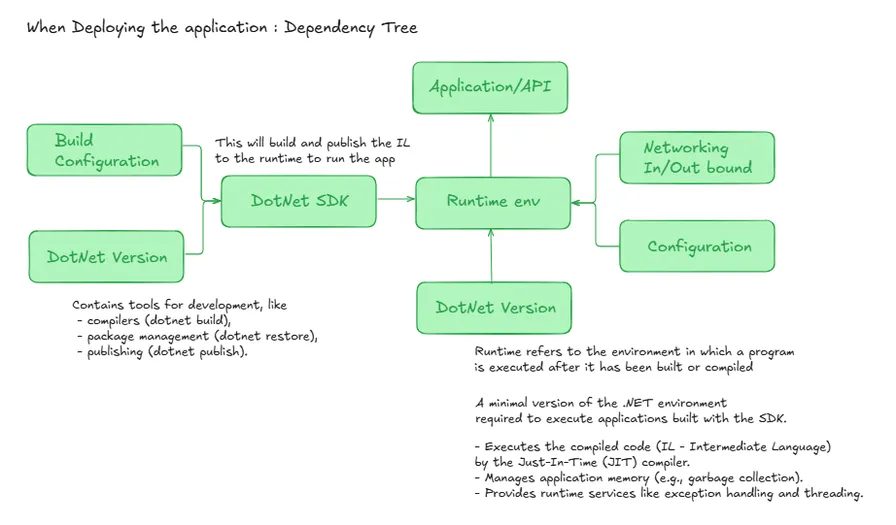
When deploying a .NET application, it's crucial to have the same version of the .NET SDK that was used during development. Mismatched versions can lead to conflicts when restoring packages or building the application. Once the app is built, it requires the appropriate runtime environment with the correct version to execute properly. This becomes a challenge when handing the raw application over to a DevOps/Testing team, as they may not be aware of the specific SDK versions or configurations, leading to potential conflicts and deployment delays.
To simplify this process, making the application independent and running it in an isolated environment is key. By containerizing the app with Docker, we encapsulate the entire application along with its dependencies and runtime environment into a single, portable unit. This ensures that the app can be deployed and run consistently across any platform, eliminating version conflicts and reducing deployment complexity. Docker makes it easy to host and scale the application globally, regardless of the underlying infrastructure.
Containerizing .NET Application
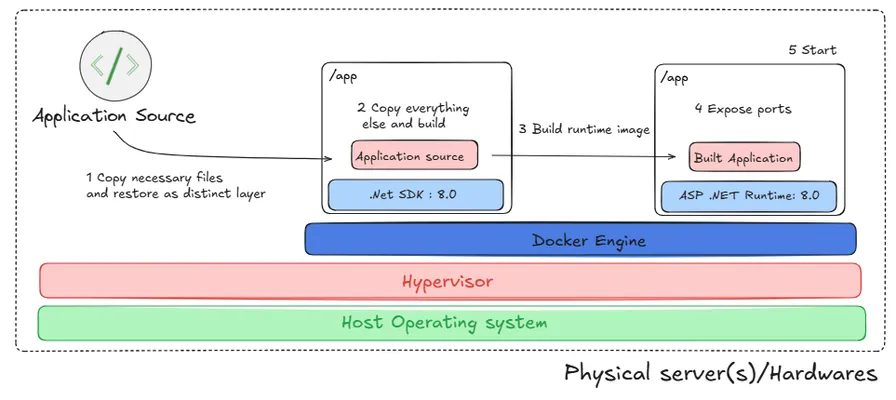
Let’s explore how the application is containerized to run independently. The central element in this process is the Dockerfile. A Dockerfile is a script that outlines the environment setup and the necessary steps to build a Docker image for your application. For a .NET application, the primary objective of the Dockerfile is to package the app and all its dependencies into a container, ensuring portability and efficiency.
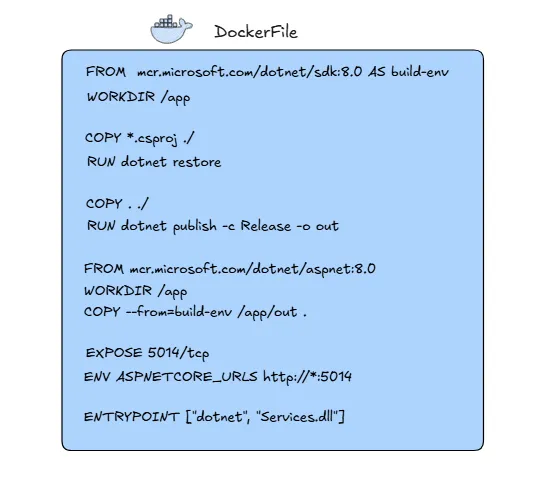
I have created a standard Dockerfile, which can be placed in the solution folder of your project. Once positioned correctly, it’s ready to be used for building and running the application in a containerized environment. This setup eliminates external dependencies and enables the application to run consistently across different systems.
Start with the .NET SDK Image
The base image mcr.microsoft.com/dotnet/sdk:8.0 provides the tools needed to build and publish a .NET application.
A working directory /app is created for managing the app files.
Copy Project File and Restore Dependencies
The COPY *.csproj ./ command copies the project file(s) into the container.
The dotnet restore command restores all necessary NuGet packages and dependencies for the application.
Copy Source Code and Build the Application
COPY . ./ copies the entire source code to the container.
dotnet publish -c Release -o out . builds the application in Release mode and outputs the compiled files to the out folder.
Prepare the Runtime Image
A smaller runtime image mcr.microsoft.com/dotnet/aspnet:8.0 is used to run the application.
The working directory /app is set again, and the compiled application files are copied from the previous step (/app/out).
Expose Ports
The EXPOSE 5014/tcp command makes port 5014 available for network communication.
Set Environment Variable
ENV ASPNETCORE_URLS http://*:5014 configures the application to listen on port 5014.
Run the Application
The ENTRYPOINT ["dotnet", "Services.dll"] command specifies the application entry point, starting the .dll file with the .NET runtime when the container runs.
This Dockerfile creates a two-stage build:
- Stage 1: Builds the application with the full SDK image.
- Stage 2: Uses a lightweight runtime image to run the built application, reducing the container's size.
After adding this, you can create a Docker image locally by running the command docker build -t in PowerShell. Once the image is built, you can start a container using docker run This will launch your application inside the container, making it easy to run and port the application by simply pushing the image to a container registry.
Conclusion
Managing dependencies and using containers make it easier to run applications smoothly across different setups. These practices help your app work better, run anywhere, and be ready for the future. By following this, .NET apps can easily adapt to new needs and technologies.
References
- https://www.docker.com/
- https://learn.microsoft.com/en-us/aspnet/core/?view=aspnetcore-8.0
- https://learn.microsoft.com/en-us/dotnet/core/tools/dependencies
- https://learn.microsoft.com/en-us/dotnet/standard/library-guidance/dependencies
- https://learn.microsoft.com/en-us/dotnet/core/docker/build-container?tabs=windows
I hope you found this article insightful and enjoyed exploring the containerization of the dotnet application in a comprehensive manner. Feel free to ping me on LinkedIn anytime.

Thank you, and have a very safe and productive day!
Ashwath Kumaran


